
There is no single fix for protecting a FiveM server against DDoS; the defence is built across four separate layers: real network-level scrubbing that covers UDP, the rate limiters inside server.cfg, server-side validation in your scripts, and a firewall at the operating system level. Miss one and an attacker simply routes around the others. And a significant share of what FiveM owners call "DDoS" is not a classic volumetric attack at all — it is an event or state bag flood triggered from inside by a connected player, and no network filter can see that. This guide works through all four layers in order.
Three structural reasons, all specific to FiveM:
Industry data backs this up: gaming absorbs roughly 19% of all DDoS attacks, and 56% of network-layer attacks are UDP floods. FiveM's exposure concentrates exactly where conventional web protection cannot see.
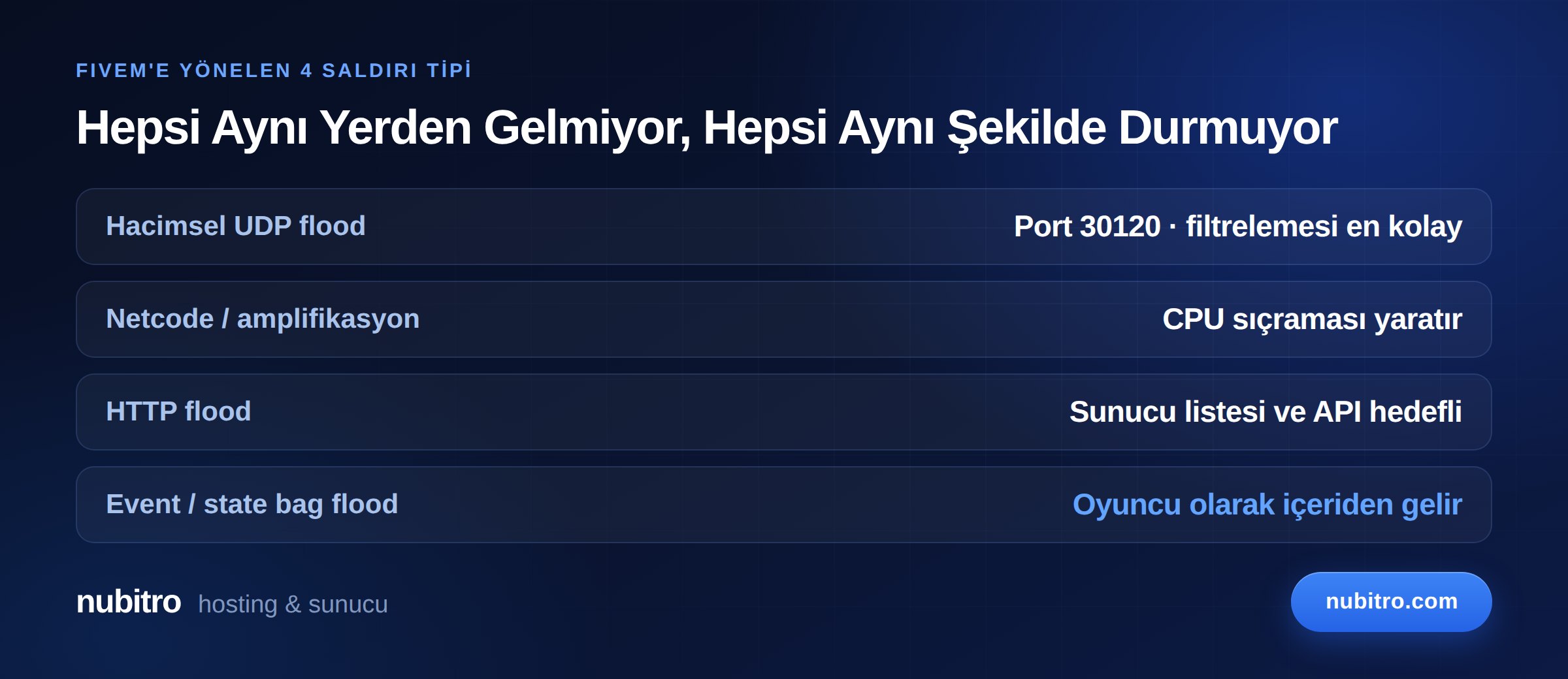
Lumping all of these together as "DDoS" is the most common reason people spend money on the wrong solution. Each is stopped somewhere different.
High-volume packets sent at the game port (default 30120) to saturate the link or the network equipment. The good news: this is the easiest type to filter — with a provider that has real scrubbing, it is usually stopped before you notice.
Volume may be low, but packets are chosen to be expensive for the server to process. The result is not a saturated link but a CPU spike and degraded tick time. Players say "the server is lagging" while traffic graphs look normal.
Targets the server list registration, the txAdmin interface, or your own web API. The game port is fine, but your server vanishes from the list or your panel will not load.
The most insidious, and here the attacker is inside your server as a legitimate player. A poorly protected net event is triggered thousands of times per second, or state bags are stuffed. No network-level protection can see this, because the traffic comes from a legitimate player and looks normal. The defence for this layer lives in your server.cfg and your script code.
Before building defences you need to know what is open. FiveM's baseline configuration:
server.cfg with endpoint_add_tcp "0.0.0.0:30120" and endpoint_add_udp "0.0.0.0:30120". Both are required; opening only one causes connection problems.The rule is simple: every port you do not use should be closed. Configure the firewall default-deny and open only what is needed.
Only your provider's infrastructure can stop volumetric attacks; no setting inside your server absorbs a 100 Gbps flood. Which makes hosting choice a security decision in FiveM.
The right questions — and "how many Gbps" is not one of them:
We covered what capacity figures mean in practice in our DDoS protection capacity guide, and the general mechanics in what is a DDoS protected server.
This is the most widely misunderstood point in the FiveM community. Cloudflare's standard services are built for HTTP/HTTPS traffic. They protect your website, forum or panel — but because game traffic flows over UDP on port 30120, the game port is not behind that protection.
The common scenario: an owner moves the domain to Cloudflare, believes they are protected, and the game server goes down when an attack arrives. The attacker was not hitting the domain — they were hitting the server's IP and game port directly.
For the full explanation see does Cloudflare protect game servers — the UDP reality. In short: valuable for the web side, insufficient for the game port.
This is the layer most owners do not know exists — and the most effective defence against event floods. A FiveM server has built-in rate limiters using a token bucket algorithm. Each limiter has a rate (tokens per second) and a burst (maximum tokens).
The main limiters and their documented defaults:
You change them like this:
set rateLimiter_netEvent_rate 40
set rateLimiter_netEvent_burst 150
How should they be tuned? The defaults are reasonable for most servers. Changing them carries risk in both directions: too loose and you stay exposed to floods; too tight and legitimate players can no longer trigger events and your scripts break. The correct method is to log a normal busy evening first, see your real event volume, and set the limit a sensible margin above it.
The challenge limiter is directly effective against connection floods; lowering it helps when an attacker exhausts the server with repeated connection attempts.
Other security variables configured in the same file:
set sv_endpointPrivacy true — hides player IP addresses from the public reports the server outputs. This matters for stopping one player on your server from harvesting other players' IPs and attacking them. On roleplay servers, player-targeted attacks are more common than people assume.
Defaults to false and should stay that way. In the official documentation's words, enabling it is not recommended — it makes the server vulnerable to security issues.
Both take an integer from 1 to 5. sv_authMinTrust (default 1) expresses how unlikely it is for a user's identity to be spoofed by a malicious client; sv_authMaxVariance (default 5) expresses how likely the identity is to change. Tightening them makes connection attempts with throwaway accounts harder — but overly strict values can lock out legitimate players, so change them gradually.
On the Enhanced edition, sv_clientConnectingTimeoutMilliseconds (default 60,000 ms) and sv_clientConnectedTimeoutMilliseconds (default 120,000 ms) limit how long half-open and dead connections hold resources. Lowering the first helps on servers seeing connection floods.
Not directly a DDoS control but important for integrity. Level 1 blocks most modified client files while allowing known graphics mods and audio files; level 2 blocks all modified client files. In practice, starting at level 1 and testing with real players generates far less support load than jumping straight to 2. Note that pure mode is not an anti-cheat — it does not replace server-side permission checks, secure events or logging.
If you do not use RCON, keep it disabled. If you do, set a strong and unique password; a default RCON password hands over the entire server.
Network protection and rate limiters stop volume; but a single badly written script lets an attacker take your server down with one player. The core principle of Cfx.re's official security guidance is blunt: nothing on the client can be trusted, because a cheating client can manipulate it.
To verify server-side that a call really came from the server, the official documentation recommends the check if source ~= 65535 then return end; the server sends netid 65535 for its own events.
On every net event, validate these using server-side methods, never the value sent by the client:
IsPlayerAceAllowed()The classic mistake is processing a client-sent "I completed the job, give me the reward" event without validation. A client triggering that hundreds of times per second wrecks your economy and hammers your database.
State bags share data between resources and are open to abuse. Enforce size limits on updates (there is a 16 KB ceiling), monitor changes with onStateBagChange, and log suspicious activity.
Apply least privilege: grant permissions such as state_bag.write and entity.control only to groups you trust. A permission left open to everyone is enough for one malicious player to lock up the server.
OneSync, the server-side synchronisation system, supports up to 2048 players (free up to 48 slots; higher tiers require a subscription through the Cfx portal). Its security-relevant feature is entity and player culling: by default, data for entities outside a 424-unit radius around each player is not transmitted. This meaningfully reduces both bandwidth and processing load.
Routing buckets let you split the world into isolated instances where players only see entities in their own bucket — valuable for both performance and isolation on multi-mode servers.
One caveat: scope events carry scaling performance costs. The official documentation recommends preferring state bags for triggering updates where possible.
At the server level:
If you have just taken delivery of a server, follow our first 10 steps to secure a new VDS.
Since most attacks end within minutes, preparation is everything. Set up in advance:
resmon), so a "lag" complaint can be attributed to network or script.When an attack hits:
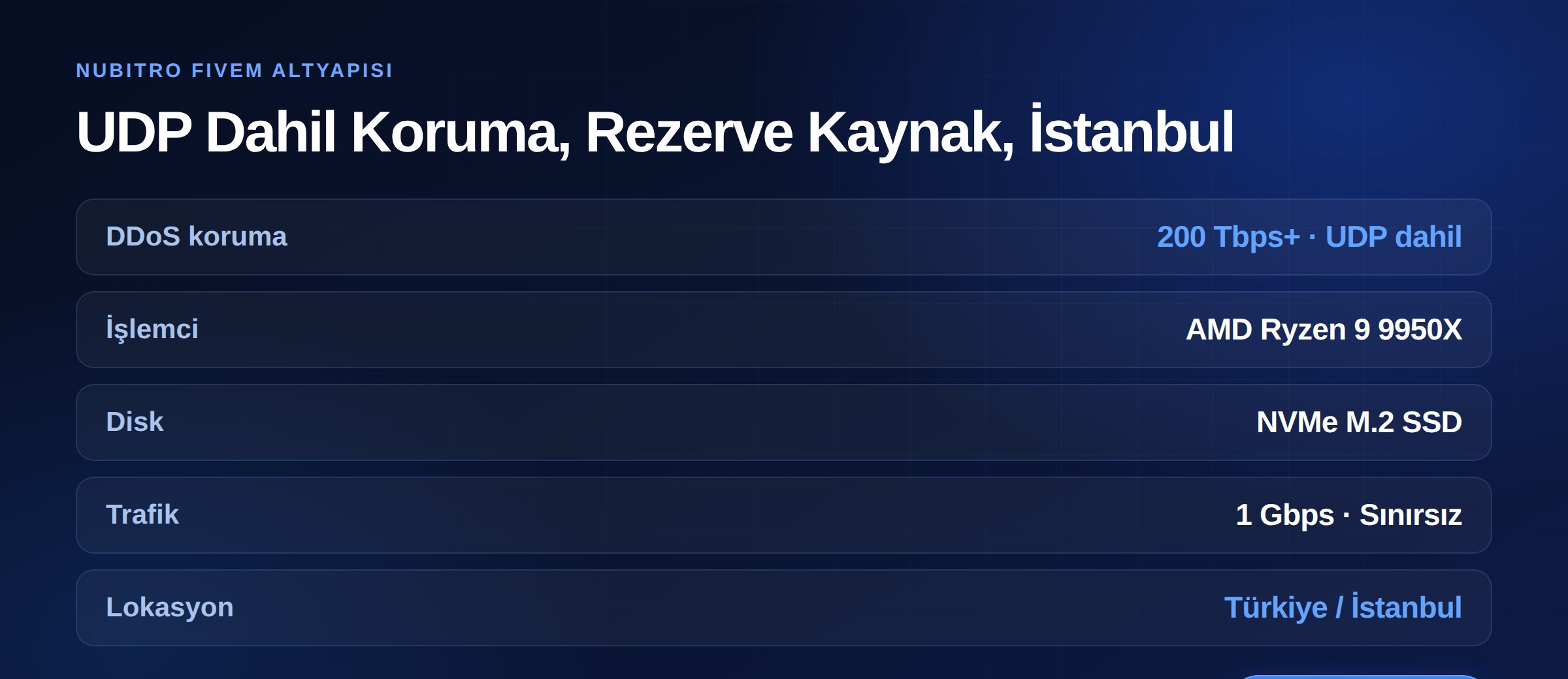
The first of the four layers above — network-level protection — depends entirely on your provider. Nubitro's infrastructure provides 200 Tbps+ DDoS protection as standard, and it covers UDP traffic as game servers require.
Servers run on AMD Ryzen 9 9950X processors in Istanbul, Turkey, with NVMe M.2 SSD storage and 1 Gbps unmetered traffic. Because resources are assigned through hardware partitioning, an attack on a neighbouring customer does not land in your tick time — in a DDoS context, that design decision matters as much as the protection itself.
Review the plans on our FiveM server hosting page, see ESX vs QBCore vs Qbox for the framework decision, and our game server hosting guide for general sizing. For everything else, visit the Nubitro homepage.
Not really. Appearing in the server list requires publishing your address. Proxy or tunnel setups that mask the real IP exist, but they add latency and a configuration mistake causes leaks. For most servers the right approach is not hiding the IP but running on a protected one.
No. Standard Cloudflare services are for HTTP/HTTPS; game traffic flows over UDP on port 30120 and falls outside that protection. Use it for your website and forum — the game port needs network-level protection.
Probably not a classic volumetric attack. Two possibilities: a netcode/amplification attack, or an event/state bag flood from inside. Measure with resmon to find which resource is eating tick time, and check the logs of players connected at that moment.
Not without measuring. The defaults are reasonable for most servers. Observe your real event volume over a normal busy evening first, then set the limit a sensible margin above it. Over-tightening blocks your own players, not the attacker.
No — these are different problems. Anti-cheat deals with cheating clients; volumetric attacks are stopped at the network layer. But good server-side validation and rate limiting reduce both cheating and event floods — that is where they overlap.
Usually not. Shutting down is the attacker achieving their goal, and it risks player data. If protection is working, you may see some added latency but the service stays up. Shutting down is only worth considering if data integrity is at risk.
Yes. In the FiveM scene the motivation is competitive rather than commercial; a member of a rival community can buy an attack to take a 30-player server down at prime time. Size offers no protection.
server.cfg, script code and firewall.sv_endpointPrivacy true hides player IPs; sv_scriptHookAllowed should stay disabled. Turkey (Türkçe)
 Worldwide (English)