
When two VDS plans both say "4 GB RAM, 2 cores" and one costs three times the other, the reason is not marketing — it is four things behind the spec sheet: whether the resources are reserved or shared, which processor generation runs underneath, whether traffic is metered, and which country the server sits in. Comparing sticker prices is therefore misleading: a cheap VDS is not actually cheaper, it has moved the cost somewhere else. This guide explains what really sets VDS pricing, where the savings in budget plans come from, and how to calculate total cost of ownership.
A provider's cost breaks down roughly into these items, and the price difference hides in nearly all of them:
Cut any one of these six and the price drops. The problem is not the cut itself — it is not knowing which item was cut.
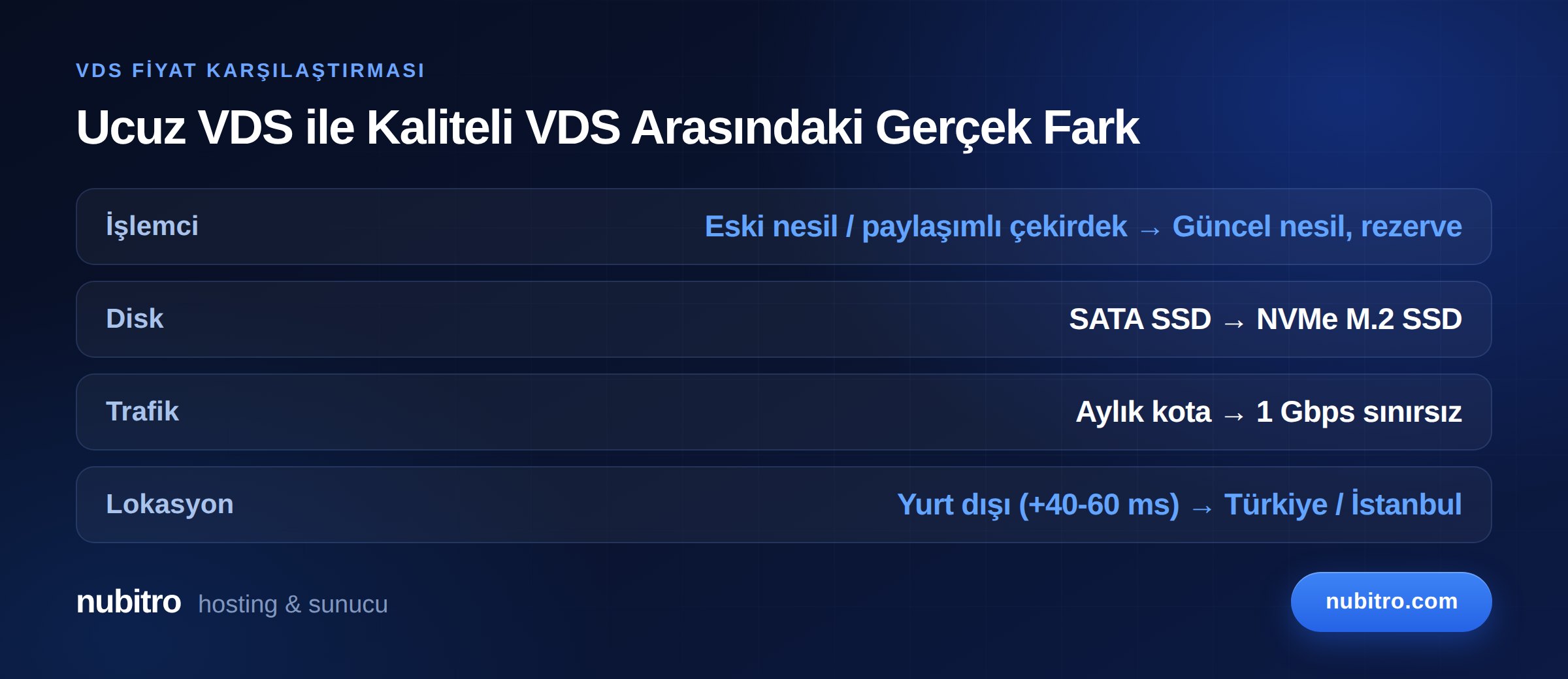
In a plan priced well below market, the cost does not disappear — it relocates. The four most common routes:
The provider places more virtual machines on a host than it could serve at full load. The assumption is that customers do not all peak at once. It usually holds — and when it does not, your server slows down without you having changed anything. Your neighbour changed.
You can measure this: run top on Linux and read the %st (steal time) value on the CPU line. Consistently above 10% during busy hours means the physical host is overloaded.
Fully amortised servers can be run very cheaply. On single-thread sensitive workloads — game servers, PHP applications, WordPress — eight older cores can be slower than four current-generation ones.
The listing says "1 Gbps port" but there is a 2 TB monthly cap, and speed drops to 100 Mbps once it is hit. Or the port is permanently rate-limited. Always ask about traffic policy as a separate line item.
On some plans, "DDoS protected" means your IP gets null-routed during an attack. The attack stops because your server stops too. Real protection means the traffic is scrubbed and the legitimate portion still reaches you.
What separates two plans that look identical on paper is what the paper does not say. When comparing, ask these four questions:
Once you have written answers to those four, the price gap between two plans is usually explained.
Monthly price is not total cost. Add these to your comparison:
A simple method: compare two candidates on a 12-month total.
That last item looks abstract but can be the largest: 30 minutes of downtime during a campaign window on an e-commerce site can cost more than a year of server price difference. This is also why the uptime commitment matters — 99.9% uptime means 43.2 minutes of downtime per month, while 99.5% means 3.6 hours.
Not every low-priced plan is bad; using it in the wrong place is. A cheap VDS makes sense for:
For production, game servers, e-commerce and anything holding customer data, consistency comes before price. We covered the technical side of that distinction in our guide on the difference between VDS and VPS, and the purchasing side in our VDS buying guide.
A price table tells you only part of what you need to know. Before deciding, look at these signals:
These signals cost nothing and can be gathered before buying. If a provider avoids answering them, the question of why its price is low remains unanswered too.
The most expensive mistake in server selection is signing a long commitment and having to migrate three months later. A practical sequence:
%st and application response times during peak hours.Those five steps take less than a month and put your year-long decision on evidence.
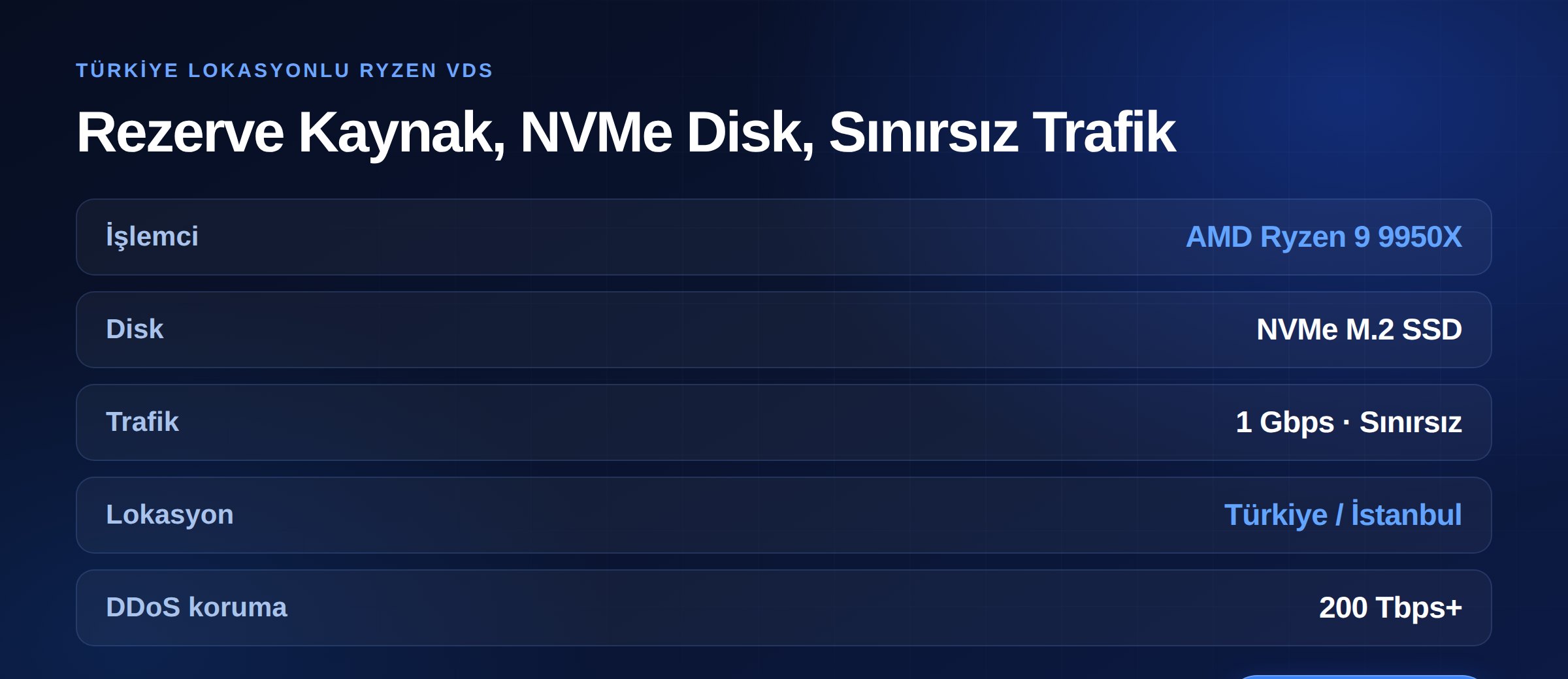
Nubitro's VDS range runs on AMD Ryzen 9 9950X processors in Istanbul, Turkey. Because resources are assigned through hardware partitioning, CPU and RAM allocation is fixed per instance — meaning none of the overselling-driven variance described above.
Configurations start at 2 cores / 4 GB RAM / 40 GB NVMe M.2 SSD and scale to 12 cores / 64 GB RAM / 180 GB NVMe, with 6, 8, 10, 12, 16, 24 and 32 GB RAM tiers in between. Every plan includes 1 Gbps unmetered traffic, and the infrastructure carries 200 Tbps+ DDoS protection as standard.
For current pricing and configurations see our VDS/VPS server page, or browse everything we offer — hosting and domains included — on the Nubitro homepage. For workloads that outgrow virtualization, dedicated servers are also available.
Because a low price is usually funded by overselling, older hardware or metered traffic. All three return as unpredictable slowdowns in production. In test environments, they are a reasonable trade.
Run top or vmstat 1 10 and read steal time (%st). Consistently above 10% during busy hours means the physical host is overloaded. Brief spikes are normal.
Annual billing usually earns a meaningful discount, but do not sign a long commitment before testing the provider. A sensible path: pay monthly for a month or two, measure performance and support response, then move to annual.
The sticker price may be lower. But 40–60 ms of extra latency for visitors in Turkey, cross-border data transfer obligations if you process personal data, and support delays from time zone differences are costs too. If your audience is entirely overseas, it can be a reasonable choice.
On average throughput the gap can be small; the real difference is consistency during peak hours. For game servers, databases and e-commerce, user experience is defined by the worst moment, not the average.
Yes — that is the right approach. Before buying, ask the provider how upgrades work: if resources can be increased in place, growth is painless.
%st); consistently above 10% is a warning sign. Turkey (Türkçe)
 Worldwide (English)